Azure
HCX Mobility Optimized Networking: Getting Your Migrated VMs Off the Trombone
If you have ever stretched a network with HCX and migrated a VM into Azure VMware Solution, you have probably hit this: the VM moved, but its traffic acted like it never left. Every packet still detours back through the on-premises gateway before going anywhere, even to reach a resource sitting right next to it in the cloud.
That threw me the first time I saw it. It is not a bug, just how a Layer 2 extension behaves once you stretch it. HCX has a feature built specifically to deal with this: Mobility Optimized Networking, or MON. What caught me out is that MON is not one switch. It is two settings that need to agree with each other, and if you flip only one, you tend to swap one bad path for a different, equally annoying one. Below are both settings, what they are actually doing under the hood, and how I ended up tuning them per workload.
What we are not covering here
This is not an introduction to HCX network extensions themselves. If you have not set one up before, the official HCX documentation covers the mechanics well. We are picking up the story after a network extension already exists and a VM has been migrated across it.
What you will need
- An HCX Enterprise deployment paired between your source site and an Azure VMware Solution SDDC.
- At least one network already extended with HCX between the two sites.
- ExpressRoute with Global Reach configured, so the on-premises site and the AVS SDDC can route to each other.
- Enough familiarity with NSX-T to recognise a segment and a Tier-1 gateway when you see one. You will not need to configure NSX-T directly, but you will be reading its routing table quite a bit.
Step 1: Lay out the scenario
To keep this concrete, here is the environment we will use for the rest of the post:
- On-premises site: a network
10.50.20.0/24, fronted by a routeredge-01at10.50.20.1, which handles both internet egress and the ExpressRoute connection back to Azure. - Azure VMware Solution SDDC: reachable via ExpressRoute and Global Reach, running HCX Enterprise, with a native NSX-T segment
10.50.30.0/24hosting a test VM calledprobe-01. - Native Azure vNet:
10.50.10.0/24, peered to the SDDC, hosting an Azure-native VM calledvnet-app-01at10.50.10.20. - A workload on the on-premises network,
legacy-app-02, that we are going to migrate into the SDDC using HCX.
Once the network 10.50.20.0/24 is extended with HCX, it exists identically on both sides: same subnet, same default gateway address, just reachable from two locations now. When legacy-app-02 migrates over, its IP, MAC, and default gateway setting (10.50.20.1) do not change at all.
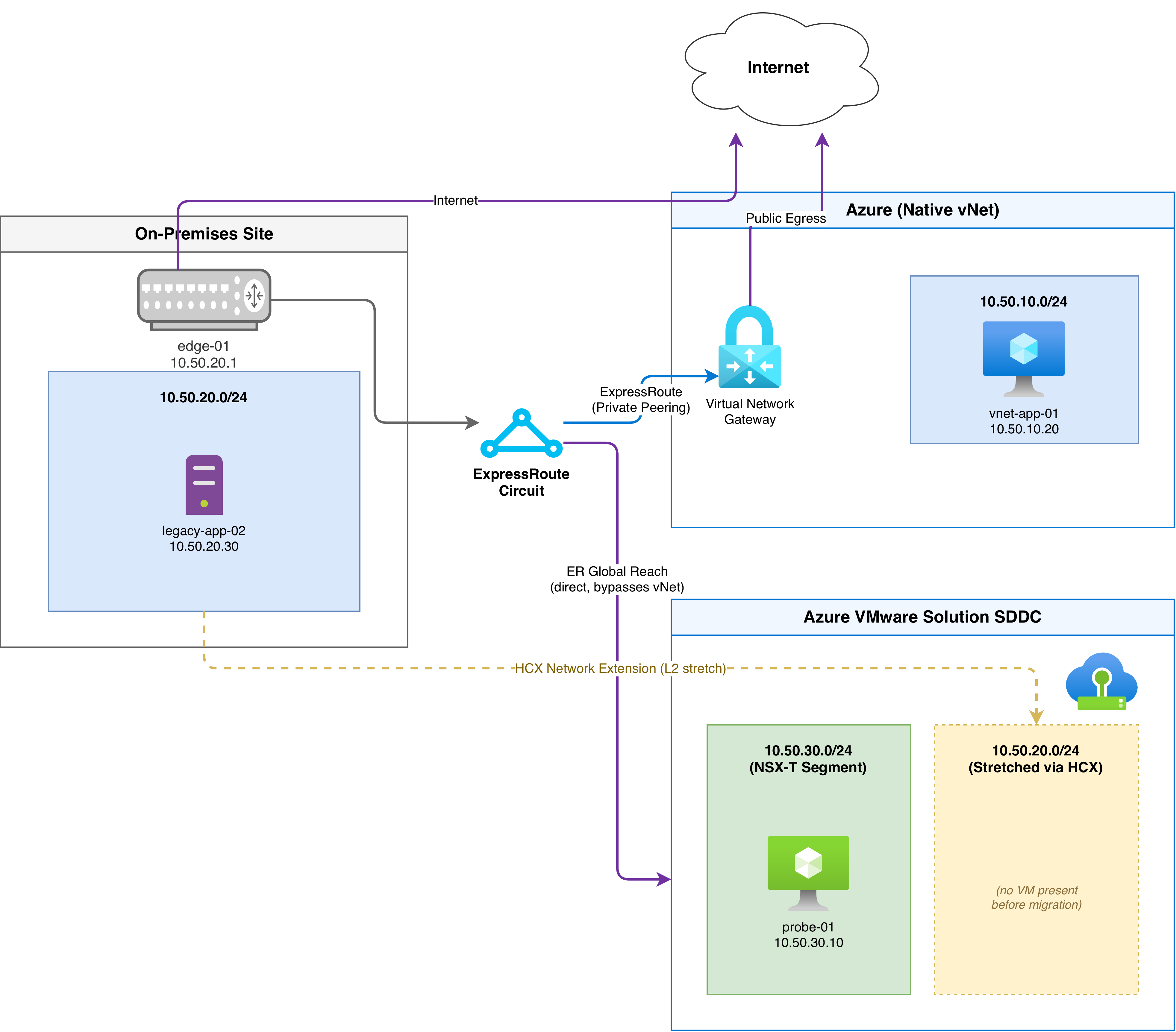 Lab topology: on-premises site, native Azure vNet, and AVS SDDC, joined by ExpressRoute, Global Reach, and an HCX network extension.
Step 2: See the problem before you fix it
Right after migration, legacy-app-02 is running inside the SDDC but its OS still points at 10.50.20.1 as its default gateway, and that gateway still physically lives on-premises. So every flow that is not destined for something else on the same stretched segment has to leave the SDDC, cross the ExpressRoute circuit back to edge-01, and get routed from there. That includes:
- Traffic to the internet
- Traffic to
vnet-app-01in the native Azure vNet - Traffic to
probe-01on the SDDC’s own NSX-T segment, which is maddening because that VM might be one hop away and the packet is instead taking a round trip through your on-premises site
That last one is the classic network tromboning pattern, and it is the case that is hardest to explain to anyone who has not seen it happen: the destination is local, the path just refuses to be.
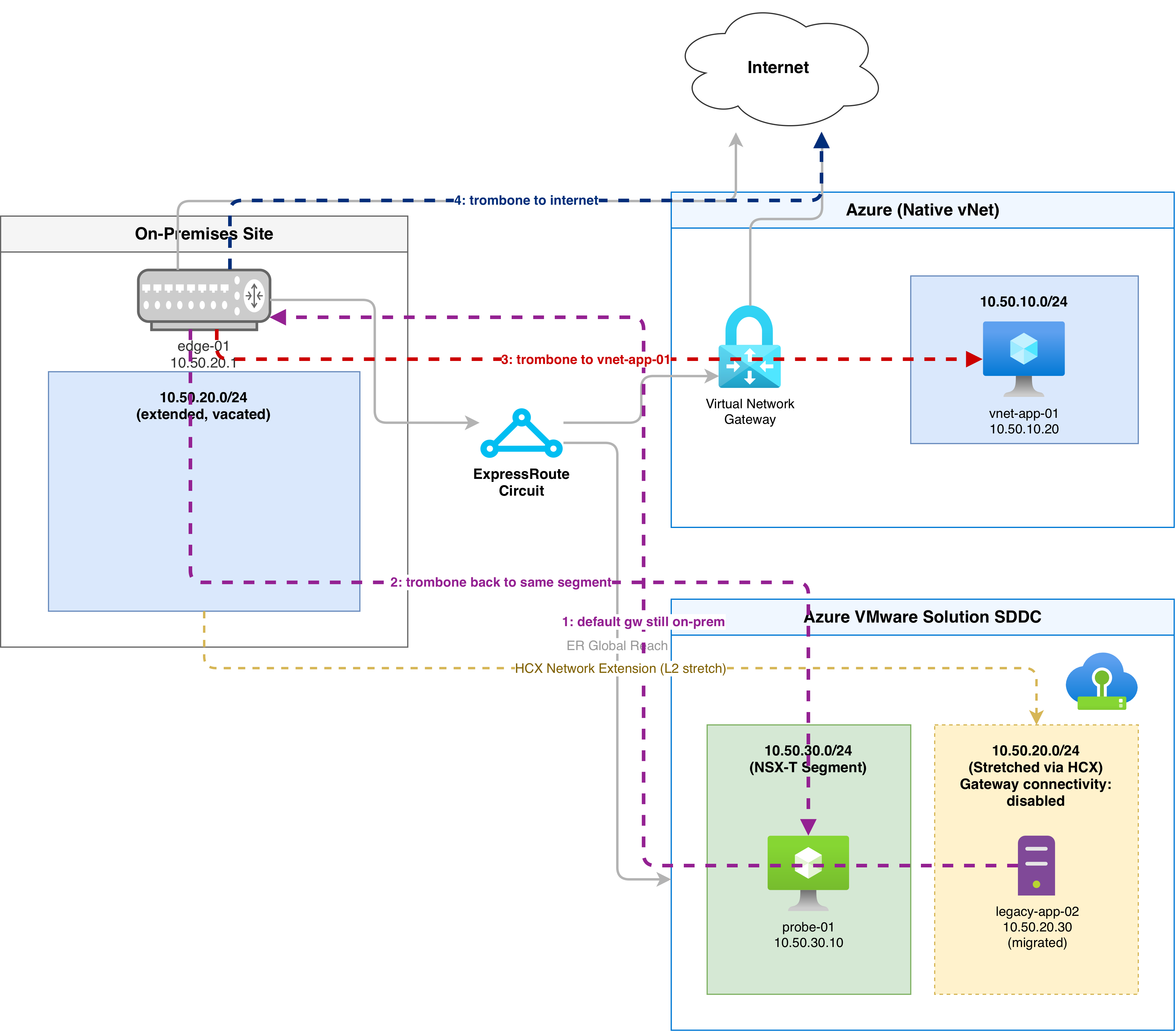 Default routing right after migration: every flow from legacy-app-02 detours through edge-01 on-premises, unless the traffic is going to a VM in the same segment.
If we check the extended segment in NSX-T at this point, you will see it was created with gateway connectivity disabled. NSX-T is not advertising a route for it, and the Tier-1 gateway has no idea it is supposed to route for it either. There is no shortcut on offer, even if the VM wanted one.
Step 3: Turn on MON
MON is enabled per network extension from the HCX UI, under the Network Extension screen. Toggle it on for the 10.50.20.0/24 extension and two things become available. Available, not automatic:
- The extended segment’s gateway connectivity switches to enabled, meaning the Tier-1 gateway is now allowed to route for it.
- NSX-T starts advertising a
/32route for the gateway address itself (10.50.20.1/32) over the ExpressRoute BGP session.
If we check legacy-app-02’s traffic now, nothing has changed. Why? That is the part that trips people up: enabling MON on the network extension only makes local routing possible. Whether a given migrated VM actually takes advantage of it comes down to a separate, per-VM setting called router-location.
Step 4: Set the router-location
Router-location controls which gateway a specific migrated VM’s traffic should prefer, and it has two values:
hcx-enterprise(the default): keep routing through the source-side gateway,edge-01in our case.- The cloud-side option: prefer the local Tier-1 gateway in the SDDC instead.
Switch legacy-app-02 to the cloud-side router-location and NSX-T adds a host route for it, 10.50.20.30/32 in our example, advertised alongside the gateway’s /32. Under the hood this shows up as a static route on the Tier-1 gateway pointing at the migrated VM.
With that change in place, here is what actually happens to traffic:
- To
probe-01on the SDDC’s own segment: routed locally through the Tier-1 gateway. Trombone fixed. - To the internet: also routed locally through the Tier-1 gateway and whatever egress path your SDDC uses (Microsoft-managed SNAT, a public IP on an NSX-T edge, or an NVA, depending on how you have set that up).
- To
vnet-app-01in the native Azure vNet: this is where it gets interesting. Outbound traffic still goes throughedge-01on-premises, because the VM’s own gateway setting has not changed, just what the network allows. But the return traffic fromvnet-app-01comes straight back through the Tier-1 gateway, because NSX-T is now advertising that/32host route directly.
That is an asymmetric path, out one way, back another. It works, but it is not clean, and if your security posture is at all strict this can actually bite you, because that return leg skips whatever inspection sits in front of edge-01.
Step 5: Understand why, then fix it with policy routes
The asymmetry comes from a second layer of configuration that MON adds alongside router-location, called policy routes. When you enable MON, HCX pre-populates a default policy for the network extension that says: for anything matching RFC1918 space, prefer the source-side gateway. Concretely, that is three allow entries:
10.0.0.0/8172.16.0.0/12192.168.0.0/16
This default exists so a migrated VM can still reach the rest of your private on-premises estate through edge-01 without extra configuration. The side effect is that vnet-app-01, sitting in a 10.x range, gets caught by the same broad rule even though it is a cloud-native resource that would be better served by the local Tier-1 path. That mismatch is exactly what produced the asymmetric route in Step 4.
You have two ways to deal with it.
Option A: clear the default policy routes
Remove all three RFC1918 entries and the picture changes: any destination outside the extended segment’s own broadcast domain now uses the local Tier-1 gateway, including vnet-app-01, which becomes fully symmetric in both directions. The trade-off is that traffic back to genuinely on-premises destinations, like some other subnet at your source site, now also takes the cloud-side path first. That may or may not be what you want, depending on how your on-premises routing and firewalling are laid out.
Option B: add a precise override instead
A more surgical approach is to leave the default RFC1918 allow rules in place and add a single, more specific deny entry for the exact resource you want to optimise:
10.0.0.0/8- send via source-side gateway: allow172.16.0.0/12- send via source-side gateway: allow192.168.0.0/16- send via source-side gateway: allow10.50.10.20/32- send via source-side gateway: deny
Policy routes get evaluated most-specific-first, so that /32 entry wins for traffic to vnet-app-01 specifically, sending it via the local Tier-1 path in both directions, while everything else in RFC1918 space still defaults to the on-premises gateway. This is the version I reach for in almost every real deployment I have built. It fixes the exact flow that was bothering you without touching the broad default that is doing its job fine everywhere else.
Step 6: Use policy routes to steer internet traffic too
Policy routes are not limited to private address ranges. You can use the same mechanism to decide where internet-bound traffic (0.0.0.0/0) goes, independent of everything above.
With router-location set to the cloud side and no internet-specific policy route, 0.0.0.0/0 simply is not covered by the RFC1918 rules, so it falls through to the local Tier-1 gateway and whatever egress path the SDDC has configured. That is usually the point of moving router-location in the first place: local internet breakout instead of hairpinning through the source site.
If instead you want the migrated VM’s internet traffic to keep going through edge-01, so you can apply the same firewall policy and logging you already have on-premises, add an explicit entry:
0.0.0.0/0- send via source-side gateway: allow
Be careful with this one on its own, though. Add it by itself and every flow that is not destined for the local segment funnels straight back through edge-01, which is exactly the tromboning problem you turned MON on to solve. I have made this mistake myself. Policy routes want to be thought through as a set, not added one at a time as problems come up.
Put all three pieces together, the segment with gateway connectivity on, legacy-app-02 set to the cloud-side router-location, and the /32 override for vnet-app-01, and the path looks like this:
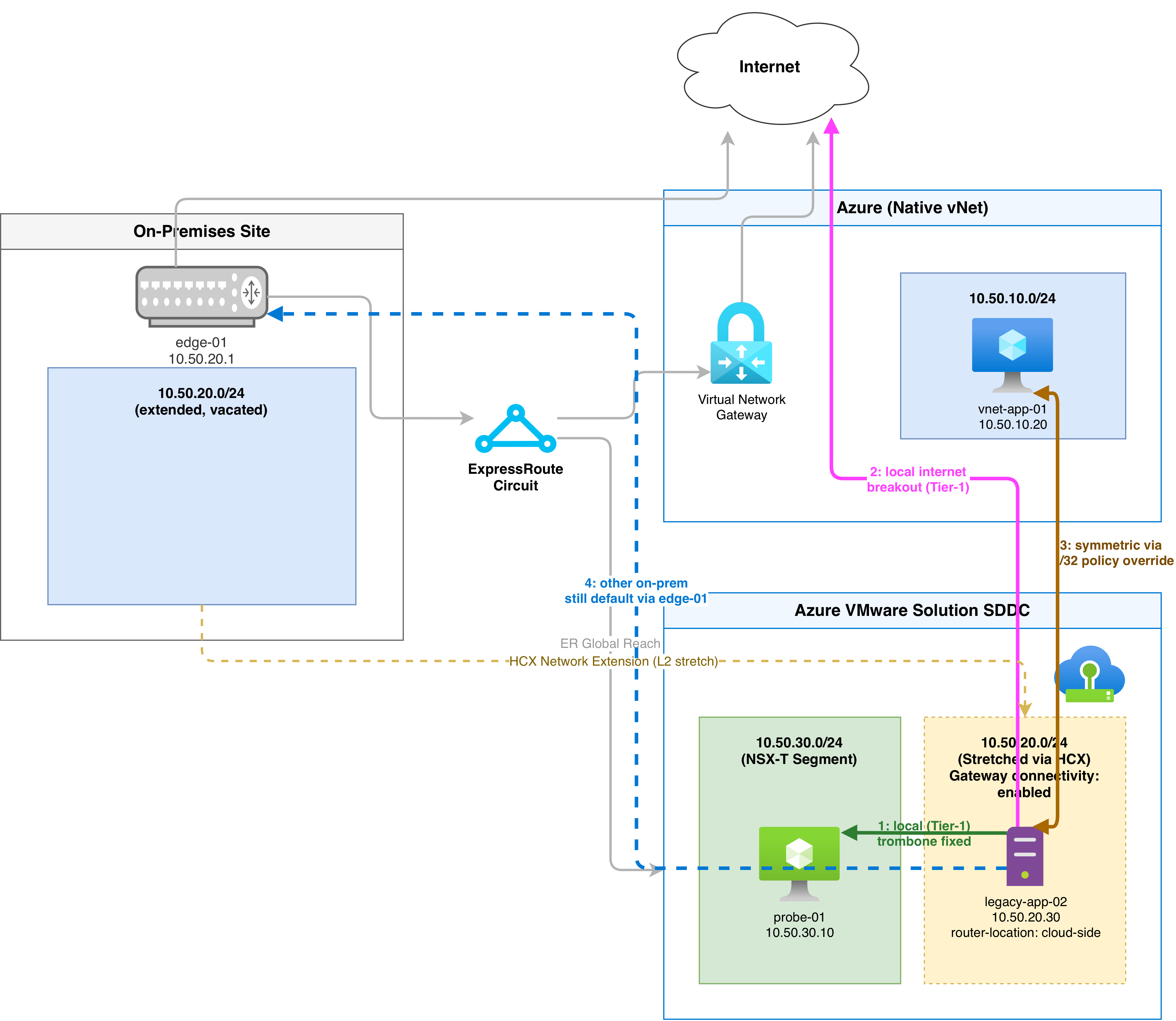 The fully tuned end state: local paths take the short route, the on-premises default still handles genuinely on-premises destinations, and the policy route override sends vnet-app-01 traffic the direct way.
A few things worth remembering
MON really comes down to three separate decisions. Whether the extended segment allows local routing at all. Which gateway a given VM prefers by default through router-location. And which specific traffic patterns get carved out with policy routes. Skip any one of the three, and you usually just move the tromboning problem somewhere else rather than removing it.
Before you roll this out anywhere that matters, a couple of things I would flag:
- Once traffic starts flowing through the Tier-1 gateway instead of your on-premises edge, it is no longer passing through whatever firewall or inspection sat in front of that edge. If that matters to your security posture, you will likely need equivalent controls on the NSX-T side.
- MON has its own documented limitations depending on workload type and NSX-T version. Worth reading through Microsoft’s MON guidance for Azure VMware Solution before you switch it on broadly.
- Treat MON as something you use to smooth out an extended migration window, not as a substitute for actually cutting workloads over. If a network extension is going to stick around for months rather than weeks, moving router-location to the cloud side for the VMs that have settled there beats leaning on policy routes indefinitely.
The first time I saw the routing table light up with those /32 host routes, and watched a traceroute stop taking the scenic route home, it finally made sense why the feature exists at all. It is a small setting that makes a big difference to how the whole environment behaves during a migration.